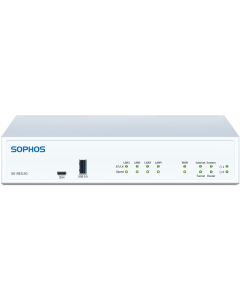
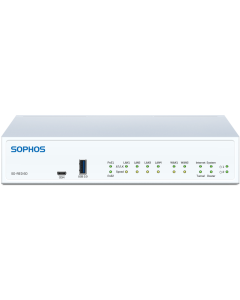
The SD-RED (Software-Defined Remote Ethernet Device) extends your firewall's protection to any remote site without sending an engineer out to configure it. Two
models cover the range: the SD-RED 20 for small remote offices, and the SD-RED 60 for busier branches that need Power
over Ethernet and extra WAN flexibility. Both are managed from the same Sophos Firewall console you already use.
Expert Pre-Sales AdviceCertified reps reply in 1 hour.
Config & Managed ServicesSkip the setup. We'll do it.
POs · Tax-Exempt · Net 30Welcomed for Corp, Edu, & Gov.
Same-Day ShippingOrder by 3pm EST, ships today.
Specifications
SD-RED at a Glance
Performance
The SD-RED 20 delivers up to 250 Mbps for small offices and home workers. The SD-RED 60 scales to
850 Mbps for higher-bandwidth branches. Both hold up in high-latency, congested conditions, with all
tunnel traffic protected by AES-256 encryption.
Physical Interfaces
Both models include 4 x Gigabit LAN ports, 1 x SFP fiber port (shared with the primary WAN), and
2 x USB 3.0 ports. The SD-RED 60 adds a second WAN port for dual-WAN or failover, plus 2 PoE ports
(30W total) to power access points directly, no injector needed.
Management and Licensing
Both are managed from your Sophos XGS or SG UTM console and need an active Network Protection
subscription on the central firewall. No per-device license is billed separately. When the firewall
runs Sophos Firewall OS, Synchronized SD-WAN is included, steering traffic across the best available
path via Security Heartbeat. Works with hardware, software, virtual, and cloud Sophos firewalls.
Optional Expansion
Each model has one modular expansion bay. Add a Wi-Fi 5 module (802.11 a/b/g/n/ac, dual-band 2x2
MIMO) for local wireless, or a 3G/4G LTE module to use mobile broadband as a primary or backup WAN.
A VDSL modem module is also available, and an optional second power supply adds redundancy. Both ship
with a 5-year hardware warranty.
SD-RED 20 or SD-RED 60?
The 20 fits small remote offices that just need a secure link home. The 60 steps up throughput, adds a second WAN
port for failover, and includes PoE for powering gear on site. Line them up side by side to see which fits your
branch.
SD-RED stands for Software-Defined Remote Ethernet Device. It creates an AES-256
encrypted tunnel between your remote site and the Sophos firewall at your main office. Once the tunnel
is active, the remote location behaves as if it is on the same local network as headquarters. All
traffic protection, content filtering, and policy enforcement happen at the central firewall, so no
additional security appliance is needed at the branch. The device works reliably even in high-latency
and congested network conditions.
Yes. The SD-RED is not a standalone firewall. It requires a Sophos XGS firewall or SG
UTM appliance at the central location to anchor the encrypted tunnel. That firewall can be a physical
appliance, a software instance, a virtual machine, or a cloud-deployed Sophos firewall. You also need
an active Network Protection subscription on the central firewall to manage your SD-RED devices.
Enter the SD-RED device ID into your central Sophos firewall console, then ship the
unit to the remote location. The person on site just plugs in power and a cable to the internet
connection. No other configuration steps are required at the remote end. The device automatically
contacts your firewall, downloads its configuration, and establishes the encrypted tunnel on its own.
The entire process takes minutes once the unit is plugged in.
The SD-RED 20 delivers up to 250 Mbps with one WAN port (shared with an SFP fiber
port), four Gigabit LAN ports, and two USB 3.0 ports. It is sized for small branch offices and home
offices. The SD-RED 60 scales to 850 Mbps and adds a second WAN port for dual-WAN or failover
connectivity, plus two PoE ports with a combined 30W budget that can power wireless access points
directly without a separate power injector. Both models include one optional expansion bay for a Wi-Fi
5 or 3G/4G LTE module, and both ship with a 5-year warranty.
No separate per-device subscription is required for the SD-RED itself. You need an
active Network Protection subscription on your central Sophos Firewall to manage your SD-RED devices.
Synchronized SD-WAN, which lets your firewall intelligently route application traffic across available
paths, is included in Sophos Firewall OS without an added charge beyond that Network Protection
license. Wireless functionality with SG UTM appliances additionally requires a Wireless Protection
subscription on the UTM side.
Yes. Both the SD-RED 20 and SD-RED 60 include one modular expansion bay that accepts
optional add-on modules sold separately. A Wi-Fi 5 module (802.11 a/b/g/n/ac, dual-band 2x2 MIMO with
two external antennas) provides wireless access at the remote site. A 3G/4G LTE module lets you use a
mobile broadband connection as a primary or secondary WAN link. A VDSL modem module is also available.
Only one module can be installed at a time. The SD-RED 60 can also power up to two PoE-capable access
points directly through its built-in PoE ports without needing the Wi-Fi module.
Not sure which SD-RED fits your remote sites?
Tell our certified Sophos engineers how many locations you are connecting, the bandwidth each site needs,
and the Sophos firewall model running at your main office. We will recommend the right SD-RED model for
every site and help you get the deployment right the first time.
Login and Registration Form
Existing User